

PHP2Shell is a pair of serious bugs in PHP (CVE-2026-109618 and CVE-2026-109619) that let attackers run code on a server without logging in. If your site runs on WordPress, WooCommerce, Laravel or any PHP, update PHP to 8.5.12, 8.4.27, 8.3.36 or 8.2.35, restart it, and check you weren't hit already.
Short version: if your website runs on PHP, and most WordPress, WooCommerce and Laravel sites do, it needs a PHP update. Today, ideally.
On 21 October PHP pushed out an emergency fix for two bugs that people are now calling PHP2Shell. They’re bad ones. Someone who has never logged in to your site can use them to run their own code on your server. Within a day there was working exploit code online, and by the 22nd a live server had been broken into.
Below we explain it without the jargon and tell you exactly what to check.
So what is PHP2Shell, actually?
It’s two separate vulnerabilities in PHP, the language most business websites are built on. Their official names are CVE-2026-109618 and CVE-2026-109619, and both are rated 9.2 out of 10 for severity. Researchers from Calif, OpenAI and Wiz found them.
The thing to understand is where the problem lives. It isn’t in WordPress. It isn’t in a plugin or your theme. It’s in PHP itself, the engine sitting underneath all of that. So if you log in to WordPress, hit “Update all” and see everything go green, you’ve fixed nothing here. That’s the part we expect to catch a lot of people out.
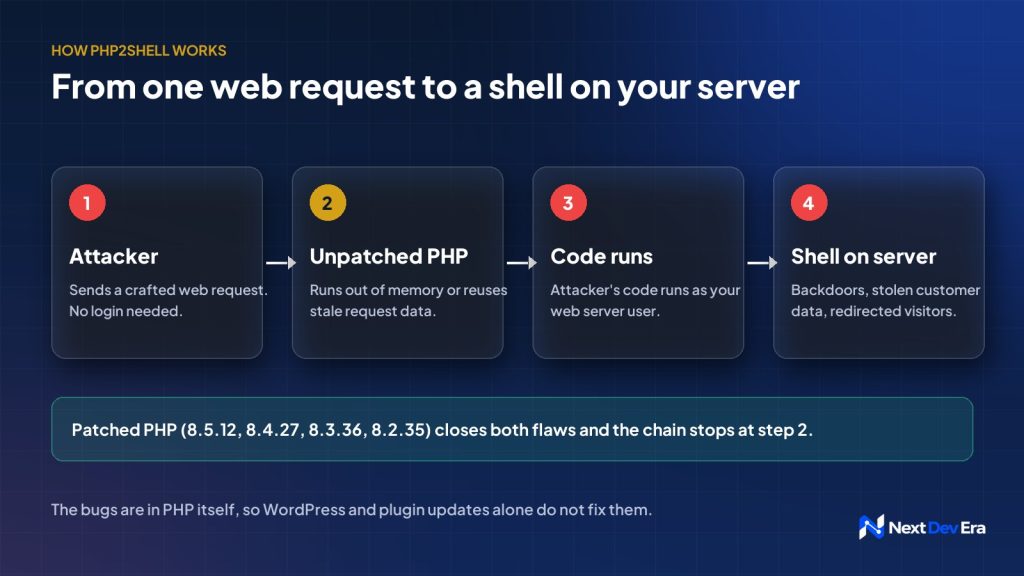
If you’re curious how the two bugs work: the first one (CVE-2026-109618) happens when PHP runs out of memory halfway through setting up a visitor’s request. It leaves the data half-built, then trusts it anyway when it cleans up. The second (CVE-2026-109619) is PHP holding on to one visitor’s data after it should have thrown it away, so the next visitor’s request can pick up the leftovers. A skilled attacker can turn either one into running code on your server.
That’s where the “shell” in the name comes from. Get far enough and you’ve effectively got a command line on someone else’s server. From there it’s backdoors, copied customer data, or your visitors quietly redirected to a scam site.
Why everyone’s in a hurry
This one moved fast, even by security standards. PHP gave a heads-up on 20 October and shipped the fix on the 21st. Cloudflare said it was already seeing attacks before the patch was even out. Sophos then confirmed a real break-in on the 22nd, where the attackers installed botnet malware.
The UK’s NCSC, CISA in the US and CERT-EU have all told people to patch straight away. And according to Qualys, only around 199,000 servers had been updated 12 hours after the fix came out. There are millions of PHP servers on the internet, so attackers aren’t short of targets.
Is my website affected?
Probably, yes, if it runs on PHP and nobody has touched the server since 21 October. Every PHP version from 5.4 right up to 8.5.11 is affected. That covers WordPress, WooCommerce, Laravel, CodeIgniter, Magento, OpenCart and plenty of custom builds, which is to say most business websites in the Gulf.
This table shows where you stand:
| PHP branch | Vulnerable | Fixed in | What to do |
|---|---|---|---|
| 8.5 | Before 8.5.12 | 8.5.12 | Update now |
| 8.4 | Before 8.4.27 | 8.4.27 | Update now |
| 8.3 | Before 8.3.36 | 8.3.36 | Update now |
| 8.2 | Before 8.2.35 | 8.2.35 | Update now, then plan a move to 8.3 or later (8.2 support ends 31 December 2026) |
| 8.1 and older (7.x, 5.x) | All | No regular release | Upgrade PHP, or use your vendor’s patched build until you can |
PHP did release some limited fixes for 7.4, 8.0 and 8.1, but they’re raw source code meant for hosting companies and server teams to build from. If you’re a business owner on PHP 7, the honest answer is that it’s time to upgrade.
If you’re on Shopify, you can relax a little. Shopify runs and patches its own platform, so there’s nothing for you to do there. The exception is anything PHP you’ve bolted on separately, like a custom pricing tool, a B2B portal or a WordPress blog on a subdomain. Those still need checking.
On shared hosting or managed WordPress, your host controls PHP, not you. A lot of hosts patched quickly. But “a lot of hosts” isn’t the same as yours, so check your PHP version in cPanel or your hosting dashboard and ask them in writing when they applied the 21 October fix.
Checking your PHP version takes about a minute
- In WordPress, go to Tools → Site Health → Info → Server. Your PHP version is listed there.
- In cPanel, open MultiPHP Manager and you’ll see the version each domain uses.
- If you have server access, run
php -v. Check PHP-FPM too (for examplephp-fpm8.3 -v), because the two can be different. If the server runs more than one PHP version, check each one a live site uses.
How to fix it
There’s only one real fix: update PHP to a patched version and restart it. PHP’s own advisory says the same thing. The workarounds further down will buy you a few hours, nothing more.
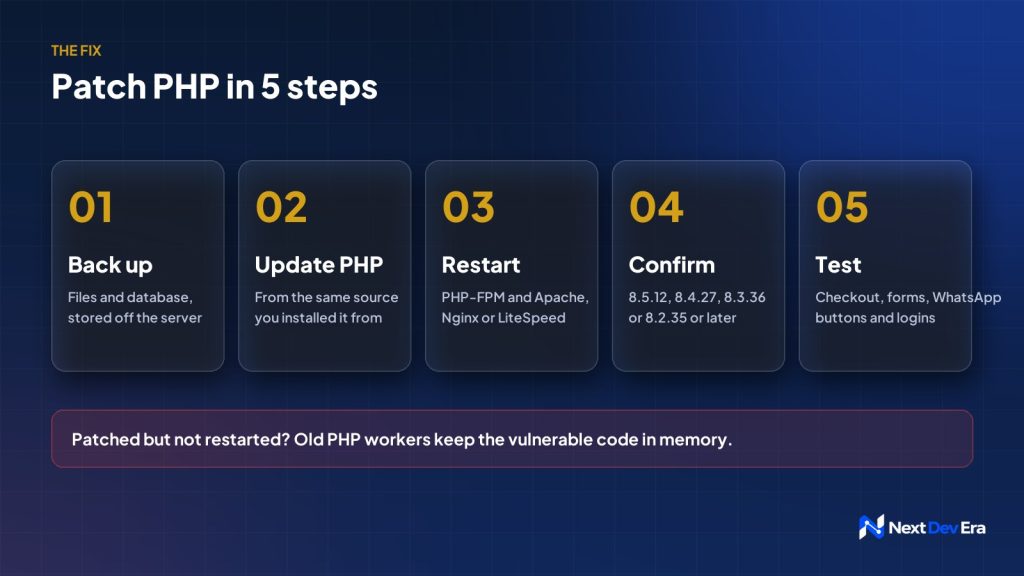
If you or your developer are doing it yourselves, go in this order:
- Back up your files and database first, and keep the copy somewhere other than the server.
- Update PHP from wherever it was installed from originally. Mixing sources tends to break extensions.
- Ubuntu or Debian:
sudo apt update && sudo apt install --only-upgrade 'php8.3*'(swap in your own version number). - AlmaLinux, Rocky or RHEL with Remi:
sudo dnf update 'php*'. - cPanel/WHM:
yum update 'ea-php*'or run/scripts/upcp, then check each version in MultiPHP Manager. - Docker: rebuild your image from a patched base image. Restarting the old container just gives you the old PHP again.
- Shared or managed hosting: ask your host to confirm the patched version on your account.
- Ubuntu or Debian:
- Restart PHP-FPM and your web server, for example
sudo systemctl restart php8.3-fpmand then Apache, Nginx or LiteSpeed. Don’t skip this. Running PHP processes keep the old, vulnerable code in memory until they restart. - Check the version again with
php -vor WordPress Site Health. You want 8.5.12, 8.4.27, 8.3.36, 8.2.35 or newer. One wrinkle: if you use your Linux distribution’s own PHP packages, they sometimes fix older-looking version numbers (it’s called a backport), so check their security notice rather than just the number. - Test the things that make you money. Place a test order, send yourself an enquiry through the contact form and the WhatsApp button, and log in to the admin area. PHP updates rarely break anything, but you’d much rather find out from a test than from a customer.
Still on PHP 7 or older? Then there’s no simple patch for you, and honestly this is your sign to move to PHP 8.3 or 8.4. Until then, use a vendor-patched build like CloudLinux alt-php or your distribution’s extended-support packages, and keep the site behind a web application firewall. If that sounds like a headache, we can do the upgrade and the testing for you.
Can’t update today?
Sometimes you can’t patch straight away, maybe because the developer’s away or the host is slow to respond. These settings make the bugs harder to exploit. They don’t make you safe, so treat them as a stopgap.
- Set
session.upload_progress.enabled = 0in php.ini and restart PHP. On PHP 8.5, also setfatal_error_backtraces = 0. (These deal with CVE-2026-109619.) - If your server can take the hit, set
pm.max_requests = 1in your PHP-FPM pool settings. Each PHP worker then handles a single request and restarts, so nothing carries over between visitors. Busy sites will feel slower, though. - For CVE-2026-109618, keep upload sizes tight (
post_max_sizeof 8M, or 32M if you really need bigger uploads) and limit how much memory each PHP worker can use. - Turn on a web application firewall. Cloudflare has already rolled out temporary rules for both bugs, and many hosts have their own WAF you can switch on.
- If the site holds customer data and you really can’t patch, take it offline or put it behind a login until you can. That’s the UK NCSC’s advice too.
And once you’ve patched, remember to take pm.max_requests = 1 back out, or your site will stay slower than it needs to be.
Were you already hacked?
Patching locks the door. It does nothing about anyone who walked in while it was open. If your server ran an unpatched PHP version at any point after 20 October, it’s worth a look.
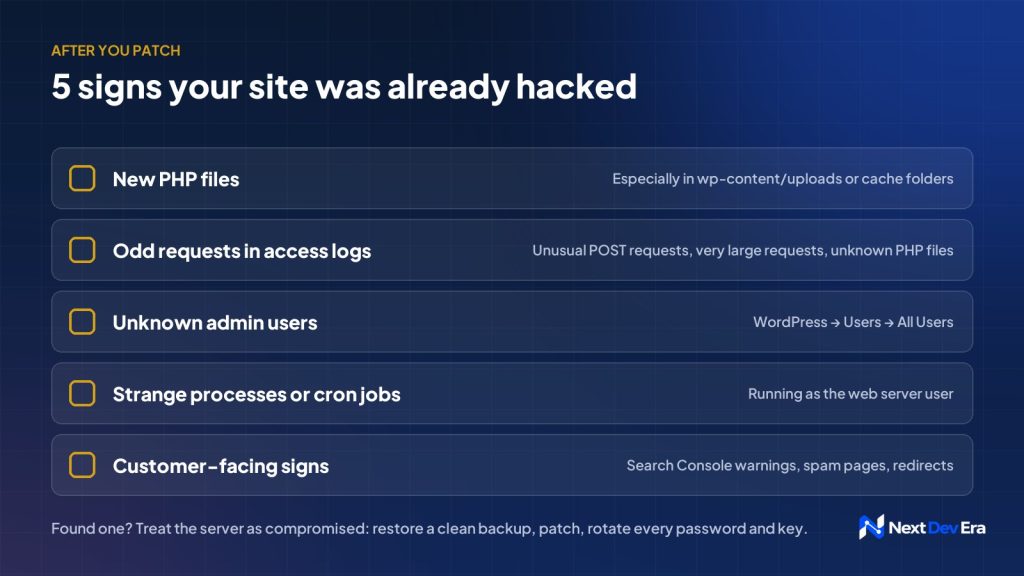
The first place we’d check is the uploads folder. PHP files have no business being in wp-content/uploads, so if you find one there, it’s almost certainly a backdoor. To list PHP files changed in the last week, run find /var/www /home/*/public_html -name "*.php" -mtime -7.
After that:
- Look through your access logs for strange POST requests, unusually large requests, or requests to PHP files you don’t recognise.
- In WordPress, open Users → All Users and look for admin accounts nobody on your team created.
- Check for processes or cron jobs running as the web server user that you didn’t set up.
- Keep an eye on Google Search Console for security warnings, and on Google for spam pages showing up under your domain. Customers saying they landed on a different site is another red flag.
If any of that turns something up, assume the server is compromised. Restore from a clean backup taken before 20 October, patch PHP, and then change everything: database passwords, admin passwords, API keys, payment gateway keys and your .env secrets.
If customer data is involved, check what you’re legally required to report before you decide what to tell customers. In Saudi Arabia, PDPL rules give you 72 hours to notify SDAIA of a breach that could cause harm. The UAE and Oman have their own data protection rules too, so it’s worth getting legal advice on your specific situation.
Mistakes we expect to see
People will update WordPress and its plugins and think they’re done. They’re not. WordPress updates don’t touch the PHP version on your server.
Others will update PHP and forget to restart it. The server looks updated, but the old code is still running in memory.
Then there’s checking the wrong version. php -v on the command line can show a different version from the one your website actually uses, so check PHP-FPM and every version listed in MultiPHP Manager.
Old staging copies and forgotten microsites are another one. If they sit on the same server, they’re just as good a way in for an attacker. The same goes for other tools you host there, like a self-hosted n8n automation server.
And finally, treating the workarounds as the fix. They lower the risk. Only the patched version actually removes the bugs.
Sources
- PHP 8.4.27 release notes (GitHub)
- CISA: Critical Vulnerabilities in PHP Require Immediate Patching
- CERT-EU Security Advisory 2026-018
- BleepingComputer: PHP ships emergency patches for critical PHP2Shell flaws
- Sophos: Proof-of-concept exploit released (updated 22 October)
- Qualys: PHP2Shell exposure and mitigations
- Google Cloud: Responding to CVE-2026-109618 and CVE-2026-109619
- Aikido: PHP2Shell affected versions and fixes

1 comment